Filtered Worklist
The Filtered Worklist link displays the worklist and a filter panel located above the worklist. The filter panel parameters allow you to filter, or search, the worklist data.
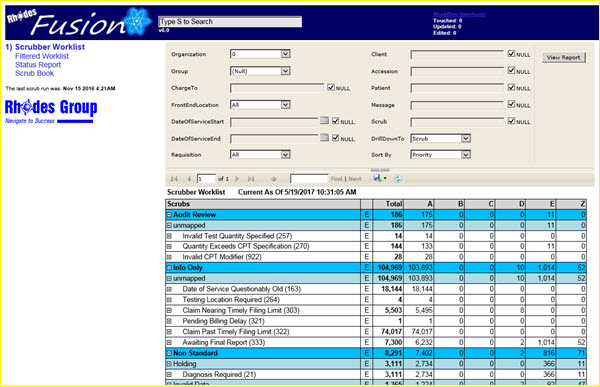
|
If it is your job to work only the BCBSNM ChargeTo coded accessions, for example, you should filter the worklist to display only those items.
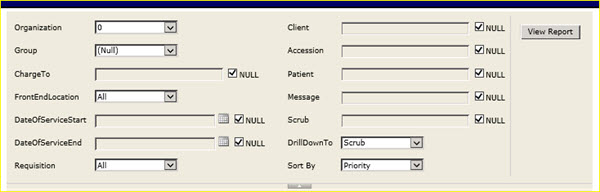
|
You may use a single filter parameter or combinations of filter parameters to find the specific records that you need.
If you need to enter a filter parameter in a field that has a NULL checkbox, first uncheck the box, then you may enter the filter parameter.
Click the View Report button to display a new filtered worklist based on the defined parameters.

|
It is possible, based on filter parameters, to be presented with results that display no records in the worklist. If this happens, remember to go to the filtered worklist search panel, remove all filter criteria and click on the View Report button. The complete worklist will then be displayed. |

| This document contains confidential and proprietary information owned by the Rhodes Group, Inc. This Information may not be downloaded, copied, or transferred, in any medium, either in whole or in part, except as allowed by the Rhodes Group. Copyright 2017, Rhodes Group Inc. | |
| Version 6.0, Release 1
Reference Manual |
Prepared by Rhodes Group
September 2017 |